Goland Unable to Resolve Directory - Modules not loading (Mac)
Hi everyone,
I’m trying out Goland on an old Mac and hit a bit of an issue where it was unable to resolve most of my modules. The weird thing was that if I ran the project from a terminal it was fine so this seemed to rule out any path issues.
This ended up being a few IDE settings – double check the following:
- Click “Goland” in the top left
- Click “Preferences”
- Expand “Go” in the sidebar
- Click “Go Modules”
- Check “Enable Go modules integration”
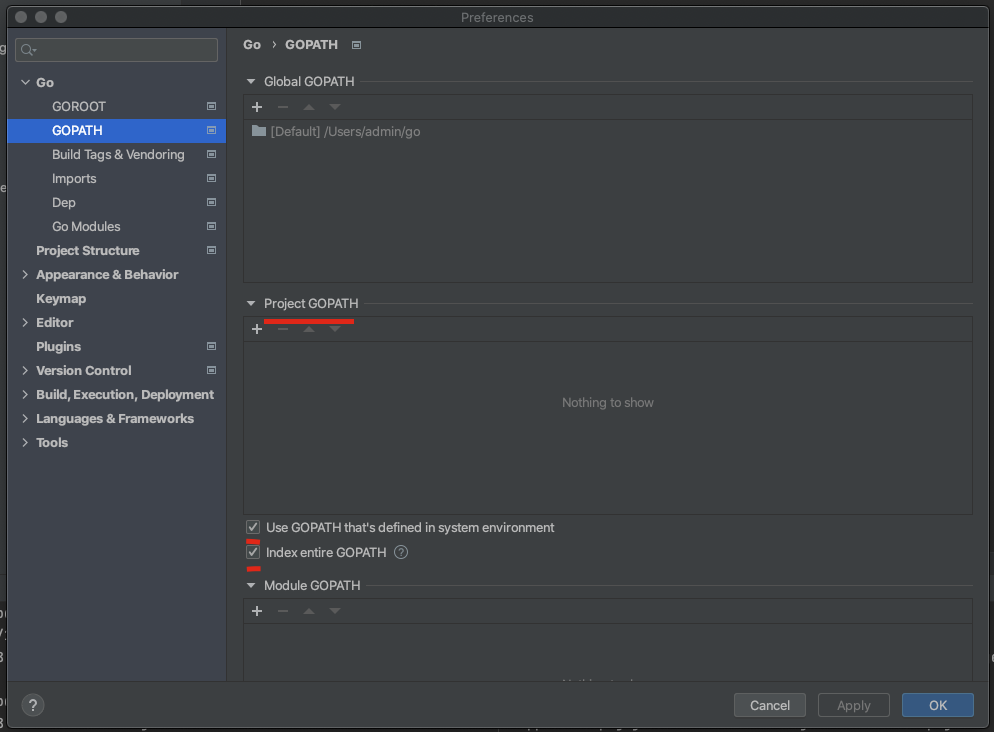
- Click “GO PATH” in the sidebar
- Ensure that there are zero entries under the “Project GOPATH” and “Module GOPATH” headings
- Ensure that “Use GOPATH that’s defined in system environment” is checked
- Ensure that “Index entire GOPATH” is checked
- Click “Apply” and “OK”
You may need to wait a short while for that indexing to refresh. If it doesn’t look like it’s doing anything run “go mod download” from your terminal. If it’s still broken restarting Goland seems to fix it up sometimes as well.
Ended up having the same issue where I can build the project but GoLand can't find my modules. This fixed the issue, thanks so much!
No worries at all - glad it worked!